

A LinkedIn Business Page is a free and easy way to create a professional online presence for your business on LinkedIn. It allows you to showcase your company’s products or services, share news and updates, and connect with potential customers and partners.
Having a well-maintained LinkedIn Business Page is essential for any business that wants to succeed in the digital age. Here are some of the key benefits of having a LinkedIn Business Page:
- Increased brand awareness: A LinkedIn Business Page helps to increase brand awareness for your business. When people search for your company on LinkedIn, your Business Page will be one of the first results they see.
- Lead generation: LinkedIn is a great platform for generating leads. You can use your Business Page to share content that is relevant to your target audience, and to run targeted ads to reach potential customers.
- Thought leadership: LinkedIn is a great platform for positioning your company as a thought leader in your industry. You can use your Business Page to share high-quality content, such as blog posts, articles, and infographics.
- Employee engagement: A LinkedIn Business Page is a great way to engage with your employees. You can use your Business Page to share company news and updates, and to celebrate employee successes.
Overall, a LinkedIn Business Page is a valuable tool for any business that wants to succeed in the digital age. It is a free and easy way to create a professional online presence, increase brand awareness, generate leads, position your company as a thought leader, and engage with your employees.
Here are some additional tips for creating and maintaining a successful LinkedIn Business Page:
- Complete your profile: Make sure to complete all of the sections of your Business Page profile, including your company description, website, and social media links.
- Share high-quality content: Share high-quality content that is relevant to your target audience. This could include blog posts, articles, infographics, and videos.
- Run targeted ads: You can use LinkedIn Ads to target your ads to people based on their demographics, job title, company, and other factors. This is a great way to reach potential customers and partners who are already interested in what you have to offer.
- Engage with your audience: Respond to comments and questions on your posts, and participate in relevant groups and discussions.
- Track your results: Use LinkedIn Analytics to track the performance of your Business Page and to see what is working and what is not.
By following these tips, you can create and maintain a successful LinkedIn Business Page that will help you to achieve your business goals.
Crafting this content is not going to come naturally, so ensure that you user some AI Tools to help you craft content, pictures, videos etc. AI Tools such as Jasper, Surfer SEO, Getjenie, Pictory, Writesonic, and Fliki.ai
How do I set up a LinkedIn business page?
To set up a LinkedIn Business Page, follow these steps:
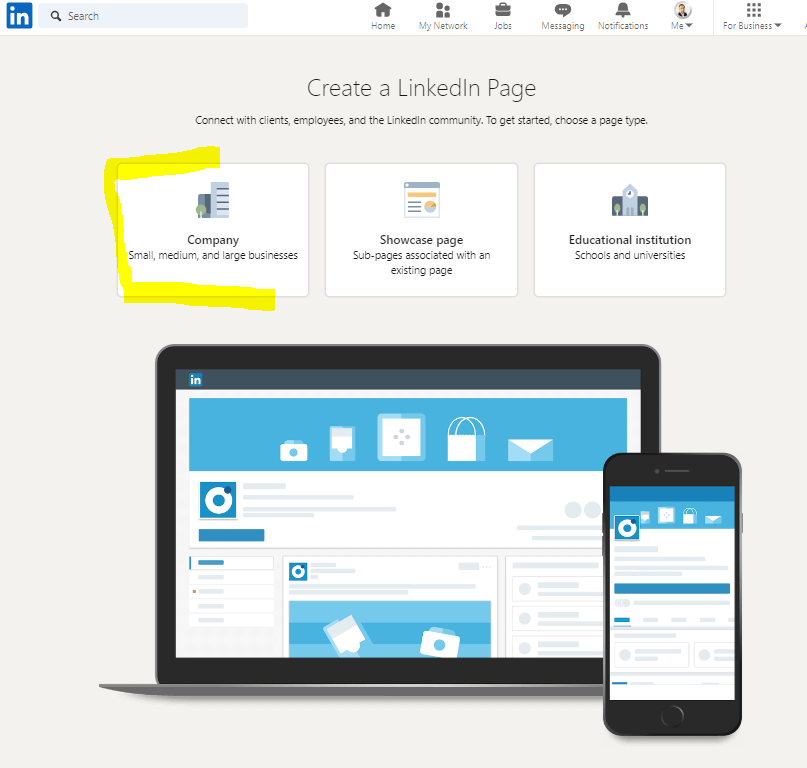
- Go to the LinkedIn Business Pages website and click on the “Create a Page” button.
- Select the type of page you want to create (Company, Showcase Page, Educational Institution).
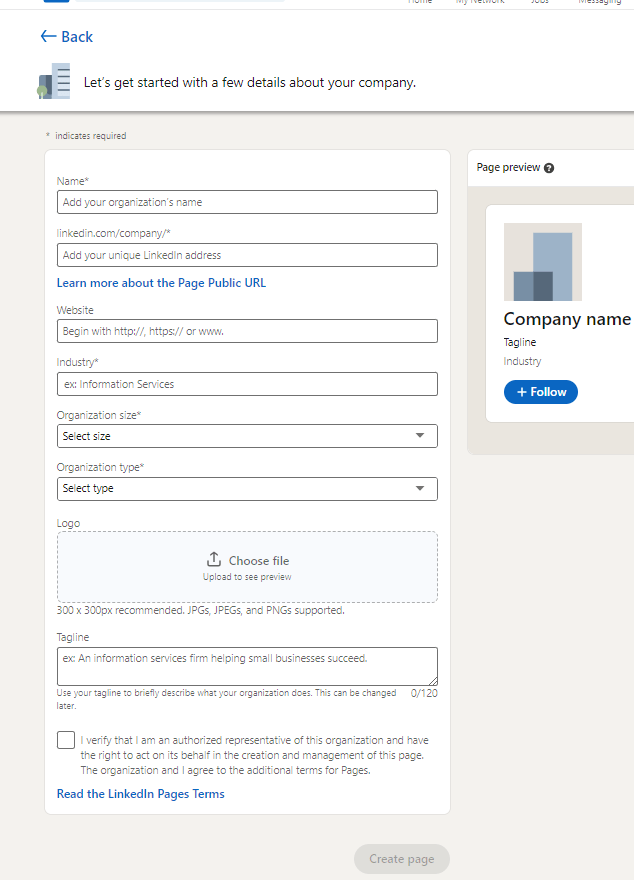
- Enter your company’s name, website, and industry.
- Add a company description, logo, and cover photo.
- Click on the “Create Page” button.
Once you have created your Business Page, you can start adding team members, sharing content, and engaging with your audience.
Is LinkedIn business page free?
Yes, creating a LinkedIn Business Page is free. However, LinkedIn also offers paid advertising options to help you reach a wider audience.
Can I create a LinkedIn business page without a personal account?
No, you cannot create a LinkedIn Business Page without a personal account. Your personal account will be used to manage your Business Page.
How does a LinkedIn business page work?
A LinkedIn Business Page is a free and easy way to create a professional online presence for your business on LinkedIn. It allows you to showcase your company’s products or services, share news and updates, and connect with potential customers and partners.
When people search for your company on LinkedIn, your Business Page will be one of the first results they see. You can also use your Business Page to run targeted ads to reach potential customers.
Your Business Page will also be listed in the LinkedIn directory, which means that people can find it even if they are not searching for your company specifically.
Examples
Here are some examples of how businesses are using LinkedIn Business Pages:
- Acme Corporation uses its LinkedIn Business Page to share news and updates about its products and services, as well as to connect with potential customers and partners.
- XYZ Company uses its LinkedIn Business Page to position itself as a thought leader in its industry by sharing high-quality content, such as blog posts, articles, and infographics.
- Beta Startup uses its LinkedIn Business Page to engage with its employees by sharing company news and updates, and by celebrating employee successes.
Overall, a LinkedIn Business Page is a powerful tool that businesses can use to achieve their marketing and sales goals.
Here are 10 FAQs for setting up a LinkedIn Business Page:
1. What are the benefits of having a LinkedIn Business Page?
There are many benefits of having a LinkedIn Business Page, including:
- Increased brand awareness
- Lead generation
- Thought leadership
- Employee engagement
2. How do I create a LinkedIn Business Page?
To create a LinkedIn Business Page, you must have a personal LinkedIn account. Once you have a personal account, follow these steps:
- Go to the LinkedIn Business Pages website and click on the “Create a Page” button.
- Select the type of page you want to create (Company, Showcase Page, Educational Institution).
- Enter your company’s name, website, and industry.
- Add a company description, logo, and cover photo.
- Click on the “Create Page” button.
Once you have created your Business Page, you can start adding team members, sharing content, and engaging with your audience.
3. Is there a cost to create a LinkedIn Business Page?
No, there is no cost to create a LinkedIn Business Page. However, LinkedIn also offers paid advertising options to help you reach a wider audience.
4. Can I create a LinkedIn Business Page without a personal account?
No, you cannot create a LinkedIn Business Page without a personal account. Your personal account will be used to manage your Business Page.
5. What information should I include on my LinkedIn Business Page?
You should include the following information on your LinkedIn Business Page:
- Company name
- Website
- Industry
- Company description
- Logo
- Cover photo
- Team members
- Products or services
- Contact information
6. How can I promote my LinkedIn Business Page?
You can promote your LinkedIn Business Page in a number of ways, including:
- Sharing your page on your personal LinkedIn profile and other social media accounts
- Encouraging your employees to share the page on their LinkedIn profiles
- Running targeted ads on LinkedIn
- Adding a link to your Business Page on your website and email signature
7. How can I engage with my audience on my LinkedIn Business Page?
You can engage with your audience on your LinkedIn Business Page by:
- Sharing high-quality content that is relevant to your target audience
- Responding to comments and questions on your posts
- Participating in relevant groups and discussions
8. How can I measure the success of my LinkedIn Business Page?
You can measure the success of your LinkedIn Business Page by using LinkedIn Analytics. LinkedIn Analytics provides insights into your page’s performance, such as the number of visitors, page views, and engagement metrics.
9. What are some best practices for setting up and managing a LinkedIn Business Page?
Here are some best practices for setting up and managing a LinkedIn Business Page:
- Complete your page profile completely and accurately.
- Use high-quality images and videos.
- Share high-quality content that is relevant to your target audience.
- Engage with your audience by responding to comments and questions, and by participating in relevant groups and discussions.
- Use LinkedIn Analytics to track your page’s performance and make adjustments as needed.
10. What are some common mistakes to avoid when setting up and managing a LinkedIn Business Page?
Here are some common mistakes to avoid when setting up and managing a LinkedIn Business Page:
- Not completing your page profile completely and accurately.
- Using low-quality images and videos.
- Sharing irrelevant content.
- Not engaging with your audience.
- Not tracking your page’s performance.
By following these tips, you can set up and manage a successful LinkedIn Business Page that will help you to achieve your business goals.
 digital-dynasty.co.za
Leave a comment