LinkedIn is the top online platform for professional networking and job hunting. But with so many features available, many job seekers wonder: Should I upload my CV (or resume) to LinkedIn?
The short answer? It depends on your job search goals and privacy preferences. In this guide, we’ll walk you through the pros and cons, how to do it properly, and whether it’s the right move for you.
Why Uploading Your Resume to LinkedIn Seems Like a Good Idea
Uploading your CV can feel like a no-brainer, especially if you’re actively job hunting. Here’s why it appeals to many:
Instant Visibility: Recruiters and hiring managers can view your qualifications quickly.
Efficiency: Makes applying for LinkedIn jobs faster—you don’t have to re-upload every time.
Comprehensive Picture: A well-designed resume may show more detail than your profile.
Let me know if you need assist with uploading, or creating a compelling LinkedIn profile:
✅ Best for: Job seekers wanting a resume visible to profile visitors.
🔹 Method 2: Upload Resume When Applying for Jobs
Click “Jobs” tab.
Find a listing and click “Apply”.
During application, upload your resume.
✅ Best for: Private use—resume only shared with the company you’re applying to.
🔹 Method 3: Add Resume to “Experience” or “About” Sections
Edit the section.
Use the “Media” option to upload.
Include context about what the resume contains.
⚠️ Less visible, but still an option.
Tips for Uploading:
Upload a PDF version to preserve formatting.
Remove private data (home address, personal phone).
Rename your file (e.g., Sarah_Khan_Sales_Resume.pdf) for SEO.
Better Alternatives to Uploading a Resume
Uploading isn’t your only option. Consider:
Fully Optimizing Your Profile: Use all sections—skills, experience, headline, summary.
Turn on “Open to Work”: Lets recruiters know you’re looking, without alerting your network.
Link to a Portfolio or Personal Website: Ideal for designers, marketers, writers, and consultants.
Use LinkedIn’s Job Preferences: Set preferred roles, industries, and locations privately.
✅ FAQs About Uploading Your Resume to LinkedIn
📌 Will recruiters see my uploaded resume?
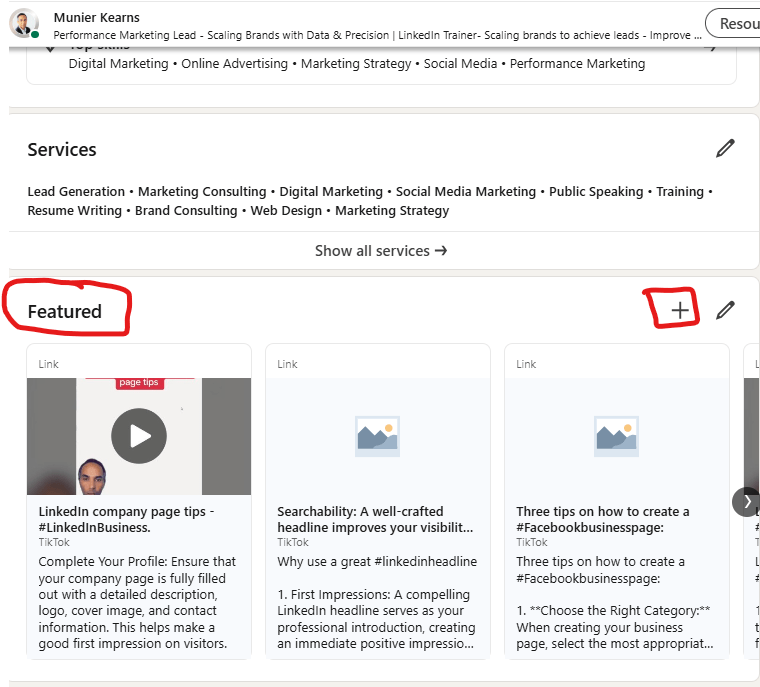
Yes, if it’s added to your Featured section or media, it’s publicly visible. However, resumes uploaded during job applications are private—only viewable by the hiring company.
📌 Can I remove my resume later?
Yes. Go to the section where it’s uploaded (e.g., “Featured”) → click the pencil/edit icon → delete the file.
📌 Is uploading a resume necessary if my profile is complete?
Not at all. A fully optimized LinkedIn profile often replaces the need for a resume. Most recruiters browse your profile first, then ask for a CV only if needed.
📌 Can I upload multiple versions?
Not publicly. You can upload different resumes with each job application privately, but your profile can only display one public resume at a time (in the Featured section).
Final Verdict: Should You Upload Your Resume?
Yes—if you’re actively job hunting and your resume is well-edited for public view. But if privacy is a concern or you’re not tailoring your CV for each role, it’s better to rely on your optimized profile and use the resume only during applications.


 digital-dynasty.co.za
Leave a comment